Delicious Food YouTube Thumbnail Design Guide
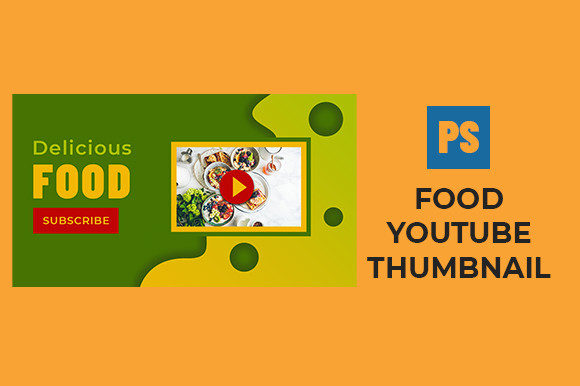
In the crowded landscape of online video, the first point of contact between a creator and a viewer is rarely the content itself; it is the visual promise made by the cover image. A Delicious Food YouTube Thumbnail serves as the digital storefront for culinary content, acting as the critical decision point that determines whether a user clicks to watch a recipe tutorial, a restaurant review, or a food vlog. When designed effectively, these thumbnails do more than just display an image; they evoke taste, texture, and aroma through pixels, compelling the audience to engage before a single second of video plays.
The concept extends beyond merely snapping a photo of a dish. It involves strategic composition, color theory, and an understanding of human psychology regarding hunger and curiosity. For those utilizing resources like a professionally layered Adobe Photoshop PSD file sized at 1280px by 720px, the goal is to leverage editable structures that allow for rapid iteration without sacrificing quality. This approach ensures that whether you are a seasoned chef or a marketing novice, the visual presentation aligns perfectly with the high standards expected in the food niche.
Why Visual Appeal Drives Click-Through Rates
The importance of a high-quality thumbnail cannot be overstated in the algorithmic ecosystem of video platforms. Different audiences interact with these images based on distinct motivations. For a casual consumer scrolling through their feed late at night, a vibrant image of a steaming bowl of ramen or a glistening chocolate cake triggers an immediate emotional response. The priority here is visual appetite. The viewer is looking for entertainment or inspiration, and the thumbnail must deliver a hit of dopamine through rich colors and sharp details.
Conversely, for a professional marketer or a small business owner running a restaurant channel, the thumbnail represents brand consistency and commercial value. Their evaluation criteria shift from simple aesthetic pleasure to metrics such as click-through rate (CTR) and brand recognition. They need a design that not only looks good but also reinforces their logo, font choices, and overall channel identity. In this context, the flexibility of an editable template becomes a crucial asset, allowing for the quick adaptation of designs to match seasonal promotions or new menu launches.
Perspectives from Beginners and Hobbyists
For beginners and hobbyists entering the world of food content creation, the technical barrier to entry can often feel daunting. Many aspiring creators possess excellent cooking skills but lack advanced graphic design expertise. This is where the utility of a properly organized, layered PSD file becomes evident. Instead of struggling to learn complex masking techniques or lighting adjustments from scratch, a novice can focus on the core content: the food.
- Ease of Use: Pre-organized layers allow users to simply swap out the background image of the dish while keeping text effects and lighting overlays intact.
- Learning Value: By deconstructing a professional file, beginners can observe how experts handle typography, drop shadows, and color grading, effectively using the template as an educational tool.
- Speed: Hobbyists often create content in their spare time. A ready-to-use template reduces the time spent on post-production, allowing them to publish more frequently.
A home cook documenting their journey to master sourdough bread, for example, might not have the budget for a custom designer. By utilizing a high-resolution template, they can present their rustic loaves with the same visual polish as a television network, leveling the playing field and helping their content gain traction among peers.
The Professional and Entrepreneurial Approach
Experienced users, freelancers, and entrepreneurs view the Delicious Food YouTube Thumbnail through a lens of efficiency and scalability. For a food blogger who publishes three times a week, consistency is key. They require a workflow that minimizes friction. A 1280px by 720px canvas is the industry standard, ensuring crisp display across desktops, tablets, and mobile devices. However, the true value lies in the "editable" nature of the source file.
Professionals prioritize flexibility and reliability. They need to know that when they change the text from "Easy Pasta" to "Spicy Ramen," the layout adjusts gracefully without breaking the design hierarchy. An organized layer structure means that a social media manager can hand off the file to a virtual assistant, who can produce ten variations in an hour. This operational efficiency translates directly to cost savings and the ability to A/B test different visual styles to see what resonates best with their specific demographic.
Furthermore, for educators and publishers, the thumbnail acts as a cover for a digital lesson. Clarity is paramount. The text must be legible even on a small smartphone screen, and the imagery must accurately represent the final result of the recipe to maintain trust. If a thumbnail promises a gooey center but the video shows a dry cake, the creator loses credibility. Therefore, the ability to fine-tune the image to match the actual video content is a non-negotiable requirement for serious creators.
Evaluating Quality and Technical Specifications
When selecting or creating assets for food channels, several technical factors influence the final outcome. The resolution of 1280px by 720px is the minimum recommended width for YouTube, ensuring that the image does not appear pixelated on high-definition displays. However, resolution alone is insufficient. The organization of the file is equally critical.
A well-structured file separates elements logically: background layers, food subject layers, text layers, adjustment layers for color correction, and effect layers for glow or sharpening. This separation allows for precise control. For instance, if a restaurant wants to highlight a new burger, they can isolate the burger layer, apply a specific warmth filter to make the cheese look meltier, and adjust the contrast of the background to make the subject pop. Without proper layering, these adjustments would be impossible without starting over.
Different stakeholders weigh these features differently:
- Creatives value the artistic freedom to manipulate light and shadow to enhance the "delicious" factor.
- Business Owners value the speed of deployment and the ability to maintain brand guidelines across hundreds of videos.
- Consumers indirectly benefit from this organization because it results in clearer, more attractive, and honest representations of the food they are about to watch being prepared.
Matching the Tool to Your Goals
Ultimately, deciding whether a specific thumbnail template or design approach fits your needs depends on your current project type and skill level. If you are a freelancer managing multiple food clients, a versatile, layered PSD file is an investment in your workflow infrastructure. It allows you to deliver high-quality results consistently, satisfying clients who demand professional aesthetics.
If you are a consumer or a viewer, understanding the effort behind these thumbnails enhances your appreciation of the content. You begin to notice the deliberate choices in color saturation and framing that make a dish look irresistible. For the educator, it is about clarity and instruction; for the entrepreneur, it is about conversion and growth.
The landscape of food media is visually driven. Whether you are capturing the steam rising from a fresh pot of soup or the crisp crunch of a fried chicken wing, the thumbnail is your primary tool for communication. By utilizing resources that offer high resolution, proper organization, and editability, creators of all levels can ensure their content stands out. The right design asset bridges the gap between a great recipe and a great video, turning passive scrollers into engaged viewers and loyal subscribers.